

Troubleshooting Smart Home Systems: The 2026 Dubai Homeowner’s Guide

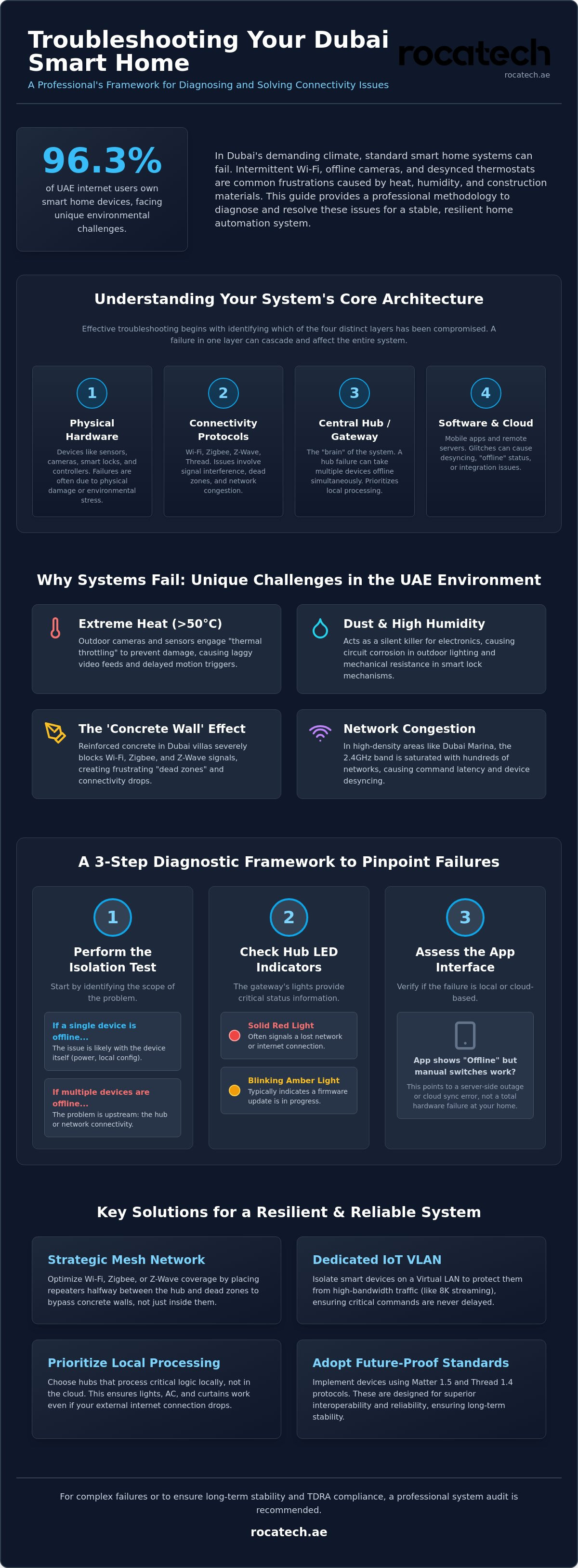
Imagine it's a humid July afternoon in Dubai and your smart thermostat suddenly loses its sync with the DEWA schedule, leaving your villa to heat up while you're away. You've likely experienced the frustration of intermittent Wi-Fi signals struggling to penetrate thick reinforced concrete walls or security cameras that drop offline during peak summer temperatures. Mastering the process of troubleshooting smart home system connectivity is essential for any resident, especially since 96.3% of internet users in the UAE now own these integrated devices.
We understand that in a high-stakes technical environment, system failure isn't just an inconvenience; it's a disruption to your lifestyle and home security. This guide provides a professional framework for diagnosing home automation malfunctions, offering precise solutions tailored to the unique climate and infrastructure of the Emirates. You'll gain the expertise needed to restore full system functionality, improve network stability, and ensure compliance with the 2026 TDRA technical standards. We'll examine a logical progression from fixing device desyncing to implementing a preventative maintenance plan that utilizes Matter 1.5 and Thread 1.4 protocols for lasting reliability.
Key Takeaways
- Define the core architecture of your automation setup to accurately differentiate between minor software glitches and significant hardware failures.
- Address the unique "Concrete Wall" signal interference found in UAE villas by optimizing your mesh network protocols and strategic hub placement.
- Implement a precise methodology for troubleshooting smart home system issues affecting essential components like smart thermostats, lighting modules, and security cameras.
- Discover the hierarchy of system resets and how to navigate complex API changes to keep your third-party integrations running smoothly.
- Recognize the critical indicators that suggest a professional system audit is necessary to restore long-term stability and operational excellence.
Why Smart Home Systems Fail: Understanding the Core Architecture
To maintain a high-performance residence, you must view your automation as a "system of systems." Reliable Understanding Home Automation Systems relies on four distinct layers: physical hardware, connectivity protocols, the central hub, and the software interface. When you begin troubleshooting smart home system issues, the first step is identifying which layer has been compromised. A software glitch is typically a temporary logic error that a simple reboot can resolve. In contrast, a failure involves physical hardware damage or structural wiring issues that require technical intervention. As we move through 2026, homeowners must adopt a stability-first mindset. It's no longer about how many devices you can connect, but how resilient those connections remain under operational load.
The smart hub gateway serves as the brain of this operation. Modern systems prioritize local processing over cloud reliance. This ensures that your smart lighting control and smart curtain motor continue to function even if the external internet connection drops. Relying solely on the cloud introduces latency and creates a single point of failure that can disrupt your entire household schedule. By keeping critical logic local, you reduce the risk of a regional server outage affecting your daily routines.
The Impact of the UAE Environment on Hardware
Dubai's extreme climate presents unique challenges that standard troubleshooting guides often overlook. Outdoor motion sensors and home security cameras often face thermal throttling when ambient temperatures exceed 50°C. This protection mechanism slows down internal processing to prevent permanent damage, which leads to laggy video feeds or delayed triggers. Dust and high humidity act as silent killers for smart lock mechanisms and outdoor lighting, causing mechanical resistance or circuit corrosion. Additionally, minor voltage fluctuations in some districts can stress sensitive controller electronics, leading to premature component fatigue and intermittent power cycles. To ensure your home's underlying systems are resilient against these environmental factors, you can visit Fazal Technical Services for expert HVAC and electrical support.
Identifying the Point of Failure
Efficient troubleshooting smart home system errors starts with the "Isolation Test." If only one smart plug is unresponsive, the issue is likely local to that device. If multiple devices across different rooms fail simultaneously, the problem lies with your connectivity or the hub. Check your hub's LED indicators; a solid red light often signals a lost network connection, while a blinking amber light might indicate a firmware update in progress. Finally, assess the mobile app interface. If the app shows "Offline" but local manual switches still work, you're likely facing a server-side outage or a cloud sync error rather than a total hardware failure.
Solving Connectivity Drops and Network Interference in Dubai Villas
Concrete and steel are the primary structural components of Dubai villas, but they are also the greatest enemies of wireless signals. Standard Wi-Fi often fails to penetrate these dense barriers, leading to frustrating connectivity drops. When you are troubleshooting smart home system issues in larger properties, you must account for this "Concrete Wall" effect. While Zigbee and Z-Wave protocols are designed to create a self-healing mesh, they can still suffer from "dead zones" if the physical distance between nodes is too great or if the signal must pass through multiple load-bearing walls.
In high-density districts like Dubai Marina or Downtown, channel congestion is a significant factor. With hundreds of overlapping networks in a single tower, the 2.4GHz band becomes saturated. This interference leads to command latency and device desyncing. Implementing a dedicated IoT VLAN (Virtual Local Area Network) is an essential strategic step. It isolates your smart devices from high-bandwidth traffic like 8K streaming or gaming, ensuring that a door lock or thermostat always has the priority it needs to function reliably.
Optimizing Your Wireless Mesh
Strategic placement of repeaters is vital for bypassing structural obstacles. Don't simply place a range extender in a dead zone; place it halfway between the hub and the problem area to maintain signal integrity. Use a Wi-Fi analyzer app to scan for local interference. If you find your neighbors are all on channel 6, manually switch your router to channel 1 or 11 to find a cleaner frequency. For Zigbee networks, you may need to perform a "mesh heal." This involves powering down all routing devices for 15 minutes, forcing the system to map more efficient paths when they reconnect.
Hardwired vs. Wireless Reliability
Wireless is convenient, but hardwired connections provide unmatched stability for high-stakes devices. We recommend that critical infrastructure, such as home security cameras, utilize Power over Ethernet (PoE). This single-cable solution provides both data and power, eliminating the risk of battery failure or Wi-Fi drops. If your home has existing Ethernet ports, ensure your smart home controllers use Ethernet backhaul rather than relying on a wireless uplink. Using shielded Cat6A cabling further protects your data streams from electromagnetic interference caused by heavy HVAC equipment. If you require a more robust network design, exploring professional network optimization can prevent these issues from recurring.
Troubleshooting Device-Specific Failures: AC, Security, and Lighting
While establishing a robust network architecture is the primary defense against system instability, individual device failures often require a more granular approach. When troubleshooting smart home system components in the UAE, you must account for the specific hardware limitations and environmental stressors unique to the region. Devices like smart curtain motors and smart door locks often experience mechanical fatigue due to dust ingress, while electronic controllers face logic errors during high-load periods. Precision in diagnosing these faults prevents unnecessary hardware replacements and restores your home's operational harmony.
Precision Cooling: Smart Thermostat Issues
The climate in the Emirates demands that your HVAC system operates with 100% reliability. If your smart thermostat in Dubai loses its connection to the central chiller system, the cause is frequently a missing or loose "C-wire" (common wire) that provides continuous power. In many older villa retrofits, the lack of a dedicated power feed causes the thermostat to power-cycle during heavy compressor starts. You should also calibrate your temperature sensors monthly. Large open-plan rooms often develop "hot spots" where stagnant air causes the sensor to trigger inefficient cooling cycles. Resolving app-to-unit latency ensures that your cooling schedules align with DEWA's peak and off-peak periods, maintaining both comfort and energy efficiency.
Lighting and Power Control
Implementing smart lighting control transforms the ambiance of a home, but it's susceptible to "ghost switching" and flickering. These issues typically occur when using "leaky" LED bulbs that allow a small amount of current to pass through even when the switch is off. This residual energy keeps the smart module partially energized, leading to erratic behavior. If your automated scenes fail to trigger, verify that the smart lighting control module hasn't entered a "protection mode" following a minor voltage spike. Similarly, smart plugs and motion sensors may require a manual reset after a DEWA grid fluctuation to resync their internal relays with your central gateway.
Mechanical failures are equally common in high-traffic entry points. Automated smart curtain motors may lose their "end-stop" calibration if the fabric is manually pulled, requiring a recalibration of the motor limits via the administrative app. For smart door locks, you must distinguish between a mechanical jam and a digital authentication error. If the deadbolt struggles to turn, the issue is often structural shifting or heat-induced expansion of the door frame rather than a software failure. Conversely, if the keypad is unresponsive, check for battery terminal corrosion, a frequent side effect of high humidity levels in coastal Dubai districts. Addressing these device-specific nuances is a critical step in troubleshooting smart home system performance for long-term reliability.
Advanced Diagnostics: Resolving Software Glitches and Integration Gaps
System stability often hinges on the logical integrity of your software environment rather than just hardware health. When the physical layer is sound, mastering the process of troubleshooting smart home system logic becomes the priority. We categorize system resets into a clear hierarchy to prevent unnecessary data loss. A soft reboot restarts the software services without cutting power. A hard power cycle involves disconnecting the power source for 30 seconds to drain internal capacitors. Finally, a factory reset should be your last resort; it wipes all custom configurations and requires a full system re-pairing, which can be time-consuming in a complex villa setup.
Managing third-party integrations requires constant vigilance over API changes. You might find that a device previously labeled "Works with Google" suddenly fails to respond. This is often due to an unannounced update in security tokens or a shift in the manufacturer's cloud architecture. High-performance homes in 2026 favor local execution over cloud reliance to eliminate the 5-second latency common in fragmented systems. Before making any significant logical changes, always secure a configuration snapshot. This backup ensures you can revert to a stable state if a new automation script causes a system-wide conflict.
Firmware and App Management
Updating firmware is a delicate operation. While updates provide essential security patches, auto-updates can occasionally "brick" a device if the power or network fluctuates during the write process. We recommend performing manual updates during low-traffic hours to maintain control. Always clear your mobile app cache and re-authenticate your tokens if a specific integration begins to lag. Avoid "Beta" software versions for critical infrastructure like your smart door lock or video doorbell. These unvetted versions prioritize novelty over the absolute reliability required for home security.
Automation Logic Troubleshooting
Complex environments often suffer from "If-This-Then-That" conflicts. This occurs when two separate automations have overlapping triggers, effectively canceling each other out. For instance, a motion sensor might be programmed to turn on a smart lighting control module, while a separate energy-saving script is trying to dim it simultaneously. Use your gateway's system logs to identify the exact second a command failed. This data-driven approach reveals whether a motion sensor is actually dead or simply experiencing a reporting delay. If your automation logic remains inconsistent, you can consult with our technical specialists to perform a deep-level system audit.
Professional System Recovery: When to Call Rocatech Experts
While basic troubleshooting smart home system protocols can resolve many connectivity and logic errors, some failures indicate deep-seated infrastructure issues. If you've performed the resets and network optimizations mentioned in previous sections but still experience persistent lag or device dropouts, you've likely reached the "DIY Limit." Complex integrated environments, particularly those utilizing high-end automation backbones, require specialized diagnostic tools that go beyond consumer-grade apps. Recognizing when an issue is structural or electrical rather than digital is the first step toward restoring your home's operational stability.
Engaging with Rocatech Dubai provides access to a consultative partnership focused on long-term system health. We don't just fix the immediate glitch; we analyze the entire lifecycle of your home's technology. Often, a professional smart home installation in Dubai is the only way to ensure that disparate systems for climate, security, and lighting work in perfect harmony. Our team specializes in stabilizing fragmented setups and converting them into unified, resilient environments that comply with the latest 2026 TDRA standards.
The Rocatech Diagnostic Process
Our recovery methodology is built on technical precision. We begin with comprehensive signal strength mapping to visualize how wireless protocols interact with your villa's specific floor plan and structural materials. We also utilize thermal imaging to inspect hardware components like the smart hub gateway and lighting controllers for signs of overheating or circuit fatigue. Once the physical environment is validated, we optimize your central gateway to prioritize local processing speed. A unique part of our service includes on-site training for household staff. This ensures they can handle basic system resets and identify early warning signs of failure, preventing minor errors from escalating into total system outages.
Future-Proofing Your Smart Home
Stability is a continuous process, not a one-time fix. We focus on future-proofing by upgrading legacy devices to Matter-compatible hardware, which ensures better interoperability and security as standards evolve. Protecting your investment from the region's electrical environment is equally critical. We implement robust, rack-mounted surge protection to shield your central automation equipment from the minor grid fluctuations that can degrade sensitive electronics over time. Preventative maintenance contracts offer the highest level of psychological benefit, as they include regular system audits and firmware vetting before deployment. If you're ready to move beyond repetitive troubleshooting smart home system tasks, you can schedule a professional consultation to stabilize your integrated lifestyle and ensure your home remains a sanctuary of precision and comfort.
Securing Your Integrated Lifestyle for the Future
Maintaining a high-performance home in Dubai requires more than just high-end hardware. It demands a deep understanding of how environmental factors and network architecture interact. We've explored the importance of distinguishing between temporary software glitches and physical hardware failures, especially when dealing with structural signal interference. Mastering the process of troubleshooting smart home system connectivity ensures that your villa remains responsive even during the most demanding summer months. By implementing a stability-first mindset, you can ensure your home remains a reliable sanctuary of comfort and precision.
While DIY methods are effective for minor resets, complex integrated systems often require the expertise of a seasoned ally. Our Dubai-based team provides comprehensive on-site audits and specializes in high-heat resilient hardware to keep your automation running smoothly year-round. As specialists with Matter and Zigbee protocol certification, we're dedicated to your system's long-term success and operational harmony. If you're ready to eliminate persistent technical disruptions, it's time to Book a Professional Smart Home Diagnostic with Rocatech. We'll help you regain full control over your automated environment with confidence and ease.
Frequently Asked Questions
Why do my smart home devices keep going offline in my Dubai villa?
Devices typically go offline due to signal attenuation caused by reinforced concrete walls and high-performance glass common in Dubai architecture. While your device may have power, the wireless signal cannot penetrate these dense materials. You should check the RSSI value in your device settings to confirm signal strength at the installation point. Adding a routing node like a smart plug can often bridge these gaps without requiring structural changes.
How do I reset my smart home hub without losing all my settings?
You can perform a soft reboot through the administrative app or web interface to clear temporary software errors without deleting your configuration data. This process restarts the operating system while preserving your custom scenes and device pairings. Avoid the physical reset button on the hardware unless you're prepared to re-pair every device. Always verify that a backup snapshot exists before attempting any system-level restart.
Can the summer heat in the UAE damage my smart home sensors?
Yes, extreme temperatures exceeding 50°C can cause thermal throttling in outdoor motion sensors and security cameras. This mechanism reduces processing power to protect internal circuits from permanent damage, which often results in lag or temporary disconnection. To prevent hardware fatigue, ensure outdoor devices are installed in shaded areas and use hardware specifically rated for high-ambient heat environments to ensure long-term durability.
Why is there a delay between my voice command and the light turning on?
Delays often occur when your system relies on cloud execution rather than local processing. When you issue a command, it travels to an overseas server and back before triggering the smart lighting control. Transitioning to local execution hubs or protocols like Thread 1.4 can reduce this latency to milliseconds. This shift ensures your home remains responsive even during periods of heavy external internet traffic.
What should I do if my smart AC thermostat isn’t cooling correctly?
Begin by checking the C-wire connection to ensure your smart thermostat has a stable power supply during heavy compressor cycles. If the unit powers on but cooling is inefficient, you may need to recalibrate the temperature sensors to account for room hot spots. Ensure your cooling schedules are correctly synced with the central chiller system to prevent logic conflicts that might bypass your energy-saving settings.
Is it better to use Wi-Fi or Zigbee for a stable smart home in Dubai?
Zigbee or Z-Wave are generally superior for large villas because they create a self-healing mesh network that bypasses structural interference. Unlike Wi-Fi, which relies on a single router, these protocols allow every powered device to act as a repeater. This architecture is essential for troubleshooting smart home system issues in high-density areas like Dubai Marina, where 2.4GHz Wi-Fi congestion frequently disrupts device communication.
How often should I update the firmware on my smart home devices?
We recommend checking for firmware updates on a quarterly basis rather than enabling automatic updates. While updates provide critical security patches, an unvetted auto-update can occasionally cause integration failures or brick older hardware if the connection is interrupted. Performing manual updates allows you to verify system stability after each change, ensuring that your automated routines and security protocols remain intact without unexpected downtime.
When should I stop DIY troubleshooting and call a professional installer?
You should call a professional when troubleshooting smart home system errors reveals persistent electrical faults or when connectivity issues require structural network cabling. If a device fails to respond after three hard power cycles or if your central gateway shows hardware-level errors, a system audit is necessary. Professional intervention is critical in high-stakes environments where security or climate control failure could lead to significant property damage or safety risks.